spawn npx ENOENT: Windows, Cursor, VS Code, and uv
The log line I keep getting pasted is spawn npx enoent. PowerShell on the same Windows 11 machine prints an npx version a second later. Both can be true. The terminal and the MCP client are not the same process, and they do not share a PATH.
MCP here is the Model Context Protocol, not a “multi-context plugin.” A local server is a child process. The client calls spawn on whatever string you put in command. ENOENT means that file name was not found. The server never starts, so the tool list stays empty.
Think of the terminal as a receptionist who knows nicknames. You ask for “npx” and she walks you to npx.cmd, or to the Node version nvm just switched on. The MCP client skips the receptionist. It asks the operating system for a file whose name is exactly npx. If that file is not on the PATH the client inherited, you get spawn npx enoent — in Cursor, in VS Code, and in Claude Desktop, on Windows and on Mac.
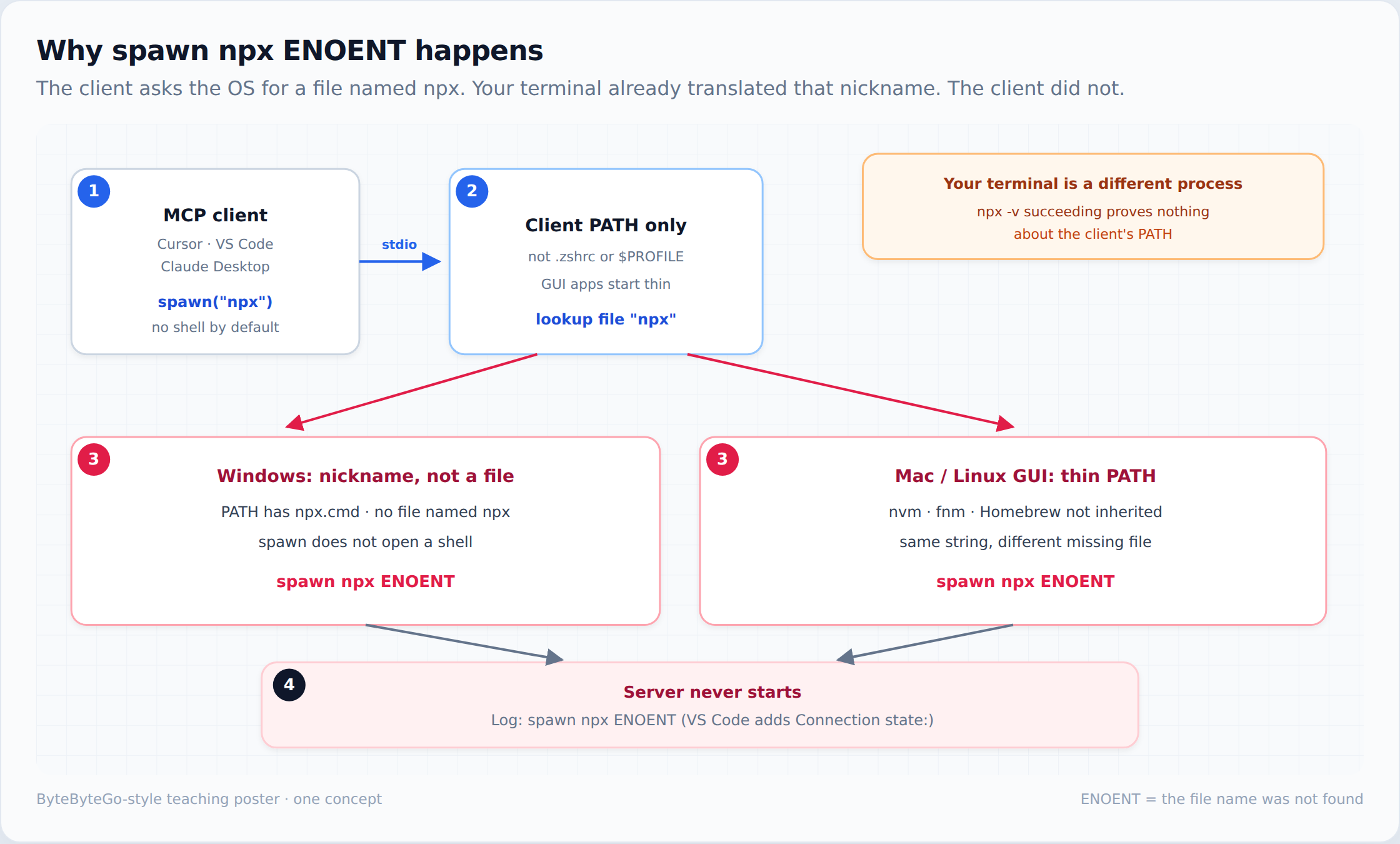
What spawn npx enoent actually means
The string is three tokens. spawn is Node’s child_process.spawn (CreateProcess on Windows). npx is the file name it asked for. ENOENT is the errno: no such file or directory. It is not a JSON syntax error, and it is not an auth failure. Those show up as parse errors or HTTP 401s. This one means the process image was never found.
npx -v in a terminal only proves the shell you typed in can see npx. GUI apps on macOS launch with a short PATH, often just /usr/bin:/bin:/usr/sbin:/sbin. They do not source ~/.zshrc, so nvm, fnm, mise, and Homebrew are invisible. On Windows the same split exists: a PowerShell profile, or an nvm-windows shim, is not what Cursor inherited when you double-clicked the icon.
Fully quit the client after you edit config. Closing the window is not a reload. Claude Desktop: right-click the tray icon and choose Quit. Cursor: quit the app, not just the window. VS Code: Exit, or close every window. On Mac, Cmd+Q. Then open it again and read the MCP log, not the integrated terminal.
Windows 11: npx is a .cmd, not an exe
On a normal Node install, where npx prints something like C:\Program Files\nodejs\npx.cmd. There is no npx.exe. Node’s spawn does not open a shell, so it does not apply PATHEXT the way cmd.exe does. It looks for a file named npx, does not find one, and returns spawn npx ENOENT.
The fix I still use is to hand the lookup to cmd. This is Cursor or Claude Desktop shape — root key mcpServers:
{
  "mcpServers": {
    "context7": {
      "command": "cmd",
      "args": ["/c", "npx", "-y", "@upstash/context7-mcp@latest"]
    }
  }
}
cmd is a real executable. /c means “run this, then exit.” Cmd then resolves npx to npx.cmd and starts it — but only if npx.cmd is already on the PATH that client inherited. A default install under C:\Program Files\nodejs is. nvm-windows or fnm that only inject PATH from a PowerShell profile is not. Cmd then prints that npx is not recognized, which is a different line from ENOENT. Escape Windows paths in JSON with double backslashes (C:\\Users\\you\\docs). A single backslash is an invalid escape and the whole file fails to parse, which looks like “no servers” rather than ENOENT.
Do not “fix” it by setting command to npx.cmd and stopping there. Node 18.20.2, 20.12.2, 21.7.3, and every later Windows Node — including current 20, 22, and 24 — reject a direct spawn of .bat or .cmd unless shell: true is set. That check shipped in the April 2024 releases for CVE-2024-27980 and did not go away. You then get spawn EINVAL, not ENOENT. MCP config cannot set that Node flag. cmd /c is the wrapper that stays on the safe side of the patch. I would not pass --security-revert=CVE-2024-27980 to get the old behaviour back.
If a sandbox blocks cmd.exe, or the client’s PATH never contained npx.cmd, point command at node.exe (a real exe) and pass the path to npx-cli.js as the first arg. On a default install that file is C:\Program Files\nodejs\node_modules\npm\bin\npx-cli.js. Copy both paths from a shell where where node already works, and confirm the js file with dir before you paste it. The path moves under nvm-windows.
Cursor MCP: spawn npx ENOENT on Windows and on Mac
Cursor reads .cursor/mcp.json in the project and ~/.cursor/mcp.json for every workspace (%USERPROFILE%\.cursor\mcp.json on Windows). The root key is mcpServers, not servers. Project wins if the same server name is in both files. A servers key is valid in VS Code and silently ignored here, which is an easy way to “fix” the wrong file.
The log line people paste from Cursor is a client error: spawn npx ENOENT, sometimes prefixed with “A system error occurred.” On Mac this is almost always the GUI PATH problem, not the .cmd problem. which npx in a terminal that already works, then paste that absolute path as command:
{
  "mcpServers": {
    "context7": {
      "command": "/Users/you/.nvm/versions/node/v22.14.0/bin/npx",
      "args": ["-y", "@upstash/context7-mcp@latest"]
    }
  }
}
Pin a real version directory. fnm and nvm keep a temporary multishell path that disappears on reboot; if which npx points at something like fnm_multishells, walk up to the installed version instead. ~ is not expanded inside JSON. After the save, quit Cursor completely. A window close leaves the old child-process environment in place.
Connection state: Error spawn npx ENOENT
VS Code prints a longer line: Connection state: Error spawn npx ENOENT. Localized builds say the same thing in another language (连接状态: 错误 spawn npx ENOENT). The English words “connection state” are VS Code’s log prefix on that one row, not a second protocol. If a panel shows spawn npx ENOENT spawn npx ENOENT, that doubled string is the same miss repeated — Cline does this. It is not a second PATH problem, and it is not VS Code’s connection-state prefix. I treat it as one failure.
VS Code reads two workspace files. .vscode/mcp.json uses a servers root key, and each local entry should set "type": "stdio". A portable .mcp.json at the project root uses mcpServers, the same key as Cursor, and VS Code reads that too. The user file is the profile mcp.json from MCP: Open User Configuration. A Cursor snippet in .vscode/mcp.json, or a servers key in Cursor, parses and then does nothing useful.
{
  "servers": {
    "context7": {
      "type": "stdio",
      "command": "cmd",
      "args": ["/c", "npx", "-y", "@upstash/context7-mcp@latest"]
    }
  }
}
On Mac or Linux, replace the cmd pair with the absolute npx path, same as Cursor. WSL is the trap I see next: VS Code created the user config on the Windows side, while the integrated terminal is Ubuntu. The Windows-side spawn looks for Windows npx and reports connection state spawn npx ENOENT even though npx -v works in the Linux shell. Put the server in the workspace .vscode/mcp.json inside the distro you actually want to spawn, or install Node on the OS that owns the config file. Do not expect terminal.integrated.env.linux to repair a Windows-side spawn.
spawn uv ENOENT is the same bug, different binary
Python MCP servers are usually started with uv or uvx, not npx. The log becomes spawn uv ENOENT or spawn uvx ENOENT. Nothing about Windows batch files has changed. The client still cannot see the file.
A default uv install lands in ~/.local/bin on macOS and Linux, and in %USERPROFILE%\.local\bin on Windows. That directory is on your shell PATH and missing from a Dock-launched editor. where uv or which uv, then set command to that absolute path. If the result is uv.exe, the path alone is enough — it is a real executable, so you do not need cmd /c. If the result is a .cmd shim (some pip layouts), use the same cmd /c wrapper as npx, or you will trade ENOENT for EINVAL on Node 18.20.2+.
Store/MSIX Claude Desktop on Windows often inherits only the machine PATH, so a bare uv still logs spawn uv ENOENT even when your terminal can see it. Setting command to the absolute uv.exe still works if that file is on disk — PATH filtering does not hide an absolute path. I do not copy uv.exe into System32. Use a machine-PATH install, or the unpackaged build, only when you cannot point command at the real file.
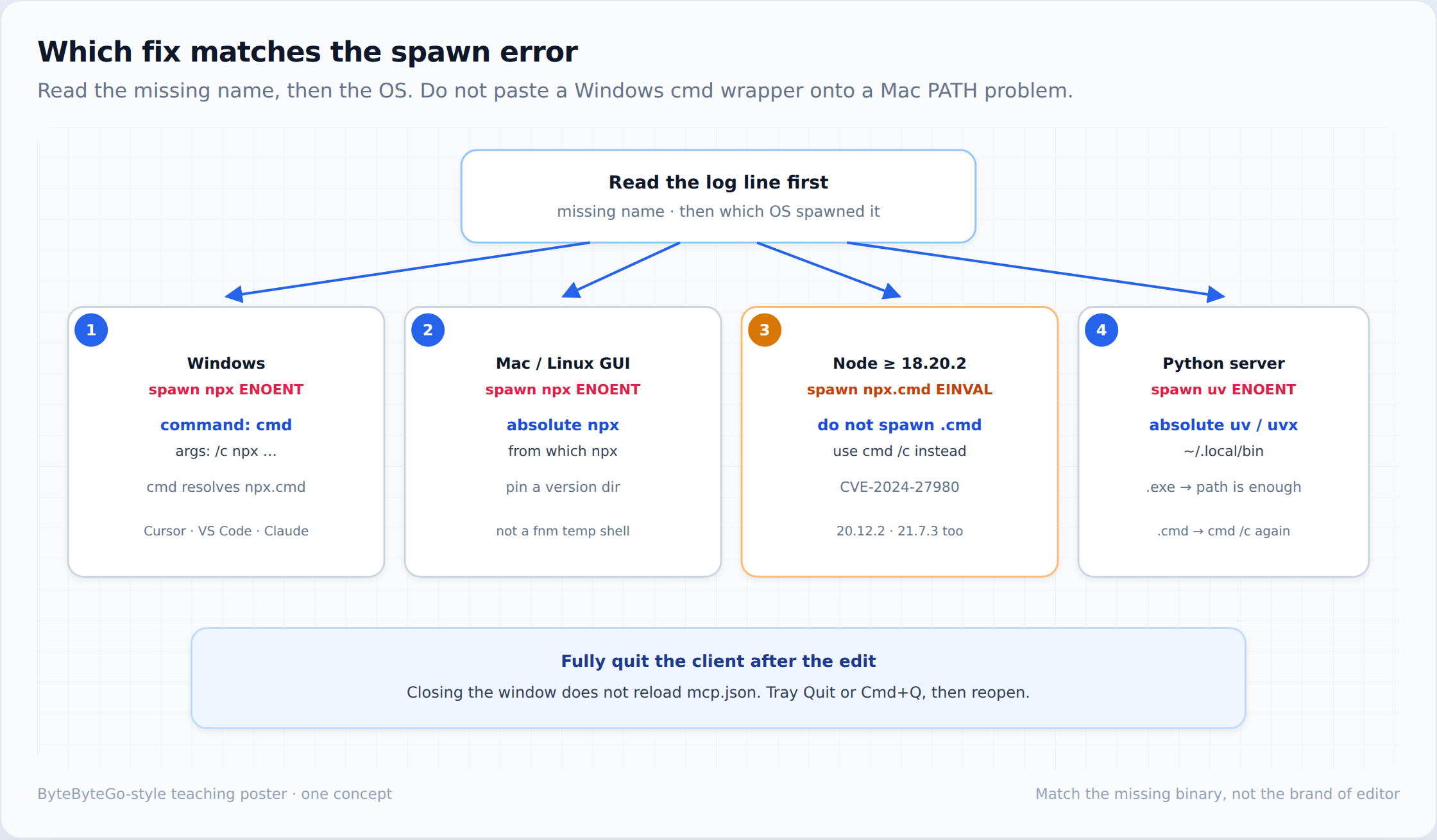
Which file you are actually editing
| Client | File | Root key | First check |
|---|---|---|---|
| Cursor | .cursor/mcp.json or ~/.cursor/mcp.json |
mcpServers |
Project file overrides global on the same name |
| VS Code | .vscode/mcp.json (servers), or project-root .mcp.json (mcpServers) |
servers or mcpServers |
Match the key to the file. WSL: edit the distro’s file. User profile: MCP: Open User Configuration |
| Claude Desktop | claude_desktop_config.json |
mcpServers |
Mac: ~/Library/Application Support/Claude/. Windows direct install: %APPDATA%\Claude\. Store/MSIX builds can read a virtualized copy under %LOCALAPPDATA%\Packages\ — edit the file the running app opens, then quit from the tray |
| Claude Code | project .mcp.json; user scope is top-level mcpServers in ~/.claude.json; local scope is under that project’s entry in the same file |
mcpServers |
Same spawn rules. A terminal-launched CLI still misses nvm if that shell did not load it |
| Log line | What is missing | What I change |
|---|---|---|
| spawn npx ENOENT on Windows | A file named npx (only npx.cmd exists) |
command: cmd, args: ["/c", "npx", ...] |
| spawn npx ENOENT on Mac or Linux | npx not on the GUI PATH |
Absolute path from which npx, version directory pinned |
spawn EINVAL after npx.cmd |
Not missing — Node refused a raw .cmd spawn |
Stop spawning the .cmd. Use cmd /c |
| spawn uv ENOENT or spawn uvx ENOENT | uv / uvx not on the client PATH |
Absolute path. cmd /c only if the hit is a .cmd |
| Connection state: Error spawn npx ENOENT | Same miss, VS Code’s log wording | Fix the file VS Code is actually spawning, then quit fully |
Stdio is why this class of bug exists at all. The client has to spawn a local process and speak JSON-RPC on stdin/stdout. If you would rather not debug PATH per laptop, an HTTP transport removes the spawn. I compared the three transports in stdio vs Streamable HTTP vs SSE. Once more than one team needs the same server, I stop shipping npx -y from each laptop and put a gateway in front — that write-up is how I design an enterprise MCP gateway in .NET.
FAQ
Why does npx work in the terminal but I still see spawn npx enoent?
The terminal sourced your shell profile. The MCP client did not. It spawned npx with the PATH it inherited at launch. Fix the command the client runs, then fully quit the app so it reloads that config.
Does cmd /c fix Cursor MCP spawn npx ENOENT on a Mac?
No. cmd is a Windows executable. On macOS or Linux the miss is PATH: nvm, fnm, or Homebrew is invisible to a Dock-launched Cursor. Set command to the absolute path from which npx.
What does Connection state: Error spawn npx ENOENT mean in VS Code?
VS Code could not start the stdio server. The words “connection state” are that log’s prefix, not a separate network error. Check .vscode/mcp.json (servers) or a project-root .mcp.json (mcpServers), on the OS that should run the process. A doubled line, spawn npx ENOENT spawn npx ENOENT, is the same miss repeated in Cline and similar panels. It is not a second PATH problem, and it is not VS Code’s connection-state prefix.
What is spawn uv ENOENT?
The client was told to run uv or uvx and that binary is not on its PATH. Point command at the absolute path. Use cmd /c only when where shows a .cmd shim rather than uv.exe.
Is command npx.cmd enough on Node 20?
Not on Node 18.20.2, 20.12.2, 21.7.3, or later. Those releases return spawn EINVAL when you spawn a .cmd without a shell, because of CVE-2024-27980. Wrap with cmd /c, or spawn node.exe against npx-cli.js.
Which config file should I edit for Cursor?
Project servers go in .cursor/mcp.json. Servers you want in every repo go in ~/.cursor/mcp.json. Both use mcpServers. Restart with a full quit after the save. A JSON comma error or an unescaped backslash fails the whole file before spawn runs.
