Azure Service Bus Peek Lock: Duration, Complete, and Abandon
I once watched a worker “succeed” on a payment event while the database write never happened. The message was already gone. That is the failure Azure Service Bus peek lock exists to stop. The broker hands you the message under a temporary lock — default 1 minute, maximum 5 minutes — and the message stays until you settle it: Complete, Abandon, Dead-letter, or Defer. Microsoft’s settlement doc is the source of those numbers. I had this page saying “about 30 seconds” for too long. That was wrong.
Think of a coat check, not a delete button. They hand you the coat and hold the ticket for a minute so nobody else takes it. You confirm you left with it (Complete), hand it back because the zipper stuck (Abandon), or send a ruined coat to lost property (Dead-letter). If you wander off, the minute ends and the coat goes back on the front of the rail. Receive-and-Delete is throwing the coat over the counter and forgetting it existed. Fine for a free flyer. Not fine for a payment.
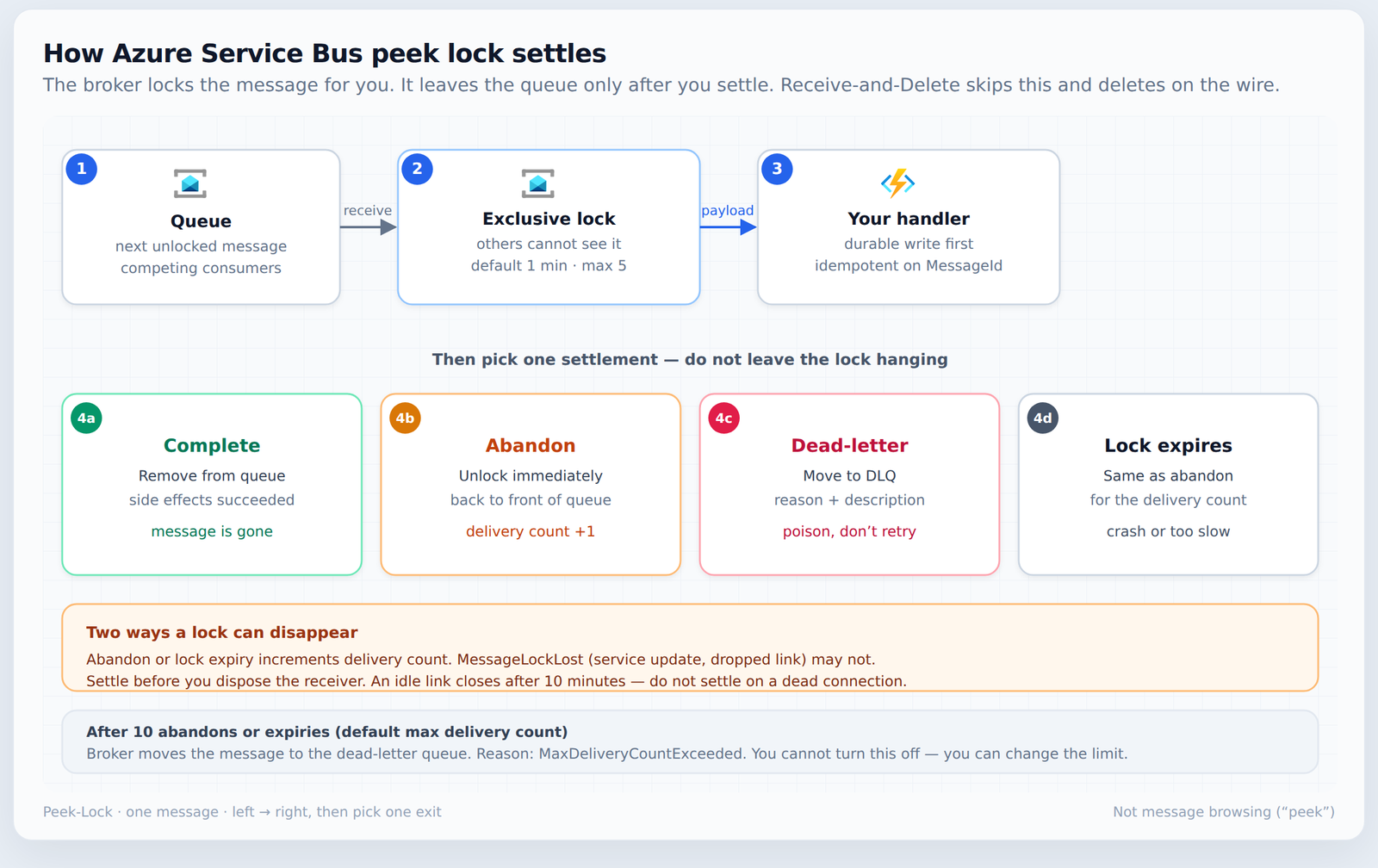
Azure Service Bus peek lock in one screen
Peek-Lock (often written PeekLock) is a two-stage receive:
- The broker gives your receiver the next message and holds an exclusive lock. Competing consumers on the same queue or subscription do not see it.
- Your code settles. Until you do, the message is still in the entity.
Naming trap: browsing (“peek”) is not Peek-Lock. Browse enumerates messages for diagnostics and does not take the processing lock. Peek-Lock is the production receive mode. If a search result is about “peek messages,” you are in the wrong article.
Peek lock vs receive and delete
This is the decision. Everything else is how you live with it.
| Mode | What the broker does | Risk | When I pick it |
|---|---|---|---|
| Peek-Lock | Locks, then removes only after Complete | Duplicate processing if you crash before Complete | Orders, payments, provisioning, any external write |
| Receive-and-Delete | Treats the message as settled the moment it is on the wire | Loss if your process dies mid-handler | Cheap telemetry, best-effort fan-out, loss is acceptable |
Peek-Lock is at-least-once. Receive-and-Delete is at-most-once. Service Bus keeps a successfully sent message until it is delivered either way. The receive mode only chooses whether the leftover risk is a duplicate or a hole. I default to Peek-Lock. I switch only when a lost message is cheaper than the idempotency work.
Azure Service Bus message lock duration
The lock duration is a property of the queue or subscription, not of your receiver. Microsoft’s default is 1 minute. The maximum you can set on the entity is 5 minutes. The client that owns the lock can extend it with RenewMessageLockAsync, or a processor can renew automatically.
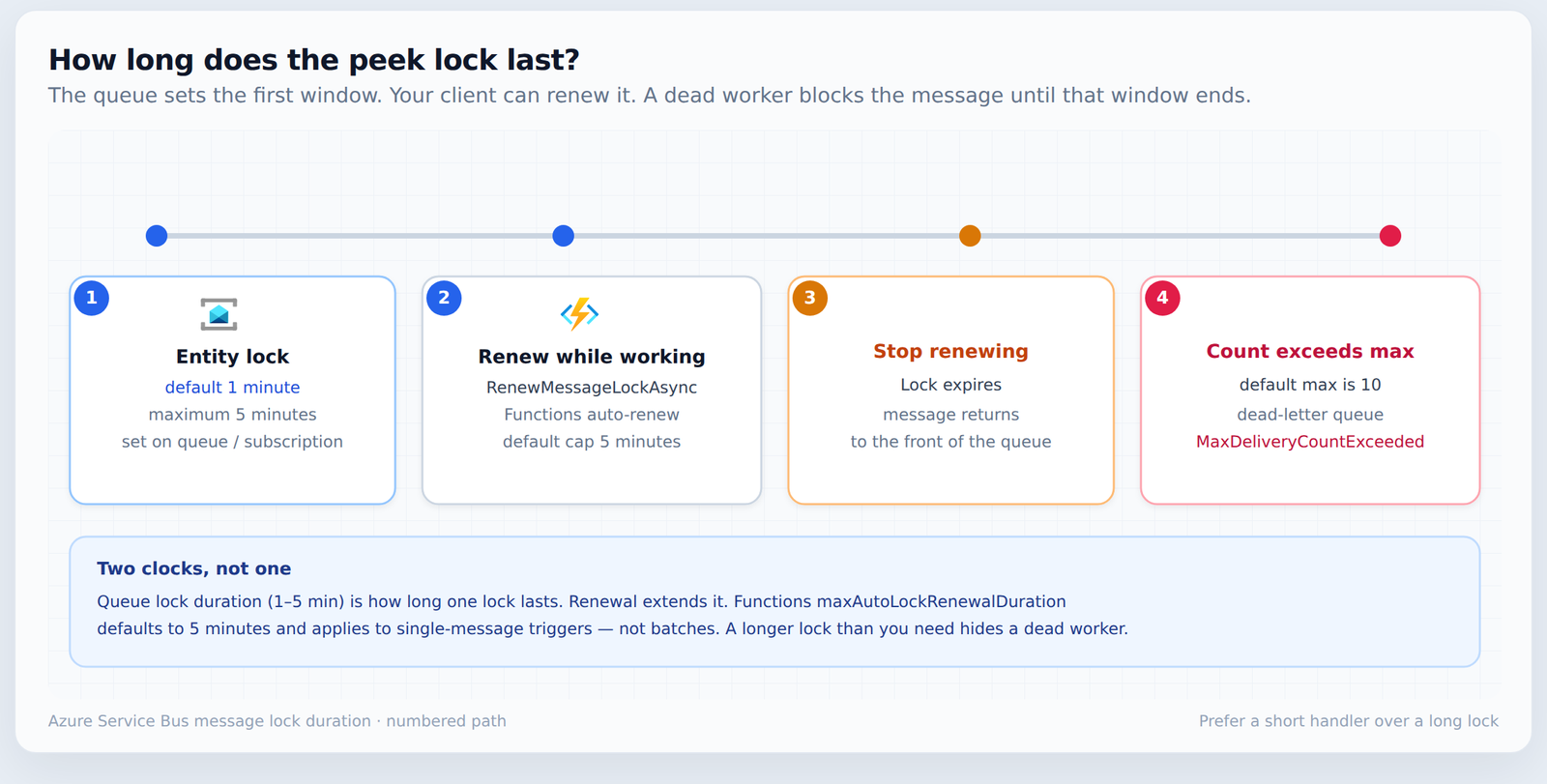
| Clock | Default | What it actually limits |
|---|---|---|
| Queue / subscription lock duration | 1 minute (max 5) | How long one lock lasts before you must renew or lose it |
RenewMessageLockAsync / processor auto-renew |
You set the cap | How long a live client can keep extending that lock |
Functions maxAutoLockRenewalDuration |
5 minutes | Auto-renew cap for single-message triggers, not batches |
| Max delivery count | 10 | Abandons + lock expiries before the broker dead-letters |
A longer lock than you need is not “safer.” If the worker dies, the message sits invisible until the lock ends. I size the entity lock a bit above normal handler time, and I renew only when the work is genuinely longer than five minutes. Prefer a smaller unit of work.
When the lock expires or you Abandon, the message goes back to the front of the retrieval order, not the tail. Delivery count increments. After the max (default 10) the broker moves it to the dead-letter queue with reason MaxDeliveryCountExceeded. You cannot disable that behaviour. You can change the max delivery count; you cannot turn the dead-letter off. Details are in dead-letter queues.
Not every lost lock increments the count. A service update, an OS update, an entity property change, a dropped connection, or session idle can surface MessageLockLost without a delivery-count bump. Do not write retry logic that assumes the count always moved. The dead-letter page describes a different path: if you close the receiver before you settle, the settlement never arrives, the lock later expires, and that redelivery does increment the count.
Settlement choices
| Action | Broker | Use when |
|---|---|---|
| Complete | Removes the message | Side effects are durable, or you recorded success under an idempotency key |
| Abandon | Unlocks now; delivery count +1 | Transient failure; retry soon is fine |
| Dead-letter | Moves to the DLQ with reason and description | Poison payload, bad schema, permanent business reject |
| Defer | Stays in the queue; normal receive will not return it | You will fetch it later by sequence number |
| Do nothing | Lock expires; same count effect as Abandon | Process crashed. Not a strategy. |
Settle while the receiver and its connection are still open. If you dispose the receiver first, the settlement never reaches the service. The lock expires, the message is redelivered, and the count goes up. Service Bus also closes an idle connection after 10 minutes, which releases the lock — settle before the link dies, and make the handler idempotent either way. Do not hold a message and settle it later on a receiver whose connection may already be gone.
Dead-letter is for messages retry will not fix. Abandon is for “try again.” Mixing those up is how a poison payload burns the delivery count and lands in the DLQ with no useful reason, or how a transient blip gets parked forever because someone dead-lettered the first failure.
Azure Functions uses Peek-Lock
The Service Bus trigger receives in Peek-Lock. With the default autoCompleteMessages: true, the runtime calls Complete if the function returns cleanly and Abandon if it throws. See the trigger reference and the host.json settings.
{
  "version": "2.0",
  "extensions": {
    "serviceBus": {
      "autoCompleteMessages": true,
      "maxAutoLockRenewalDuration": "00:05:00"
    }
  }
}
If the function runs longer than the entity lock, the runtime renews the lock while the invocation is still running, up to maxAutoLockRenewalDuration (default 5 minutes). That setting is for functions that receive one message. It does not cover batches. A batch that overruns the lock is your problem.
Do not swallow exceptions. A try/catch that logs and returns tells Functions the message is done. Downstream failed; the queue moved on. If you catch, rethrow — or dead-letter on purpose with a reason. Set autoCompleteMessages to false only when you will call ServiceBusMessageActions yourself (Complete, Abandon, or Dead-letter). Poison handling is still Service Bus max delivery count. Functions does not give you a separate poison policy.
Example in C# (Azure.Messaging.ServiceBus)
The older Microsoft.Azure.ServiceBus and WindowsAzure.ServiceBus libraries lose official support on 30 September 2026. New code uses Azure.Messaging.ServiceBus.
using Azure.Messaging.ServiceBus;

await using var client = new ServiceBusClient(connectionString);
await using var receiver = client.CreateReceiver(
    queueName,
    new ServiceBusReceiverOptions { ReceiveMode = ServiceBusReceiveMode.PeekLock });

ServiceBusReceivedMessage? message =
    await receiver.ReceiveMessageAsync(TimeSpan.FromSeconds(10));
if (message is null)
    return;

try
{
    // Durable write first. Key it on message.MessageId.
    await ProcessAsync(message);
    await receiver.CompleteMessageAsync(message);
}
catch (ServiceBusException ex) when (ex.Reason == ServiceBusFailureReason.MessageLockLost)
{
    // Lock already gone. Do not Abandon — the count may not have moved.
    throw;
}
catch
{
    // Transient failure: unlock now so another attempt can run.
    await receiver.AbandonMessageAsync(message);
    throw;
}
What matters: receive under Peek-Lock, finish the side effect, then Complete, and do that before the await using disposes the receiver. In production I prefer ServiceBusProcessor (concurrency cap, MaxAutoLockRenewalDuration) over a one-off receive loop. The same rule applies inside the connectors I ship: the sequence gate completes the current message and schedules a copy instead of sleeping on the lock. Sleeping holds a slot and still loses the lock if you outlast renewal.
Decision guide
| Question | If yes |
|---|---|
| Is a lost message a business incident? | Peek-Lock, not Receive-and-Delete |
Can the same MessageId run twice safely? |
Required. Store processed IDs or an outbox row before Complete |
| Is normal work longer than the 1-minute default? | Shorten the work, or renew. Do not set 5 minutes “just in case” |
| Will retry never succeed? | Dead-letter with a reason. Do not Abandon in a loop |
| Is this Azure Functions? | Assume Peek-Lock. Do not catch-and-return on a real failure |
FAQ: Azure Service Bus peek lock
What is Azure Service Bus peek lock?
Peek-Lock is a receive mode. Peek lock in Service Bus is the production path: the broker locks the message so other consumers cannot take it until you Complete, Abandon, Dead-letter, or Defer — or the lock expires. It is at-least-once delivery. It is not the same as browsing (peek) messages for diagnostics.
Peek lock vs receive and delete — which should I use?
Use Peek-Lock when losing the message is unacceptable. Use Receive-and-Delete only when at-most-once loss is cheaper than handling duplicates. Peek-Lock can deliver the same message twice. Receive-and-Delete can drop it if the process dies after the broker puts it on the wire.
What is the Azure Service Bus message lock duration?
Default is 1 minute on the queue or subscription. The maximum entity setting is 5 minutes. Renew with RenewMessageLockAsync or a processor’s auto-renew if the handler is longer. Azure Functions renews automatically while a single-message function is running, up to maxAutoLockRenewalDuration (default 5 minutes).
What happens when the message lock expires?
The message becomes visible again at the front of the queue, and the delivery count increments. After the max delivery count (default 10) the broker dead-letters it with reason MaxDeliveryCountExceeded. Design the handler so a second delivery does not double-charge or double-email.
Does Azure Functions use Peek-Lock?
Yes. The trigger receives in Peek-Lock. By default it Completes on success and Abandons on failure. A swallowed exception looks like success. Rethrow, or settle explicitly if you turned auto-complete off.
Is “peek” the same as Peek-Lock?
No. Peek / message browsing lists messages without the processing lock. Peek-Lock is the locked receive path your worker should use.
Closing
Azure Service Bus peek lock is the difference between “we think we processed it” and “we settled after the write.” Pair it with an idempotent handler, Abandon for blips, Dead-letter for poison, and a lock that matches real handler time — 1 minute unless you have measured otherwise. That is the whole scoreboard.
Related: how I wire these connectors on Azure Functions, and why the sequence connector refuses to sleep on the lock.
