Technical Insights: Azure, .NET, Dynamics 365 & EV Charging Architecture

Author: fransiscuss Page 5 of 19

MERGE Insert, Update and Delete SQL Server

In SQL Server 2008, we can do a table synchronisation in one transaction of SQL Command. For example normally, we have a source table and then we have an updated records and what we would like to do is "I want to delete the record from the source table if it is not in my updated list, if there is a matched record then I’d like to update the value to the latest value, and if the record is not exists at all on the source table then I’d like to insert it"

I got a sample query with the recordset and syntax below in how to use "MERGE" to handle the case above. I got the actual sample code from (http://www.mssqltips.com/sqlservertip/1704/using-merge-in-sql-server-to-insert-update-and-delete-at-the-same-time/) – by Arshad Ali

IF EXISTS(SELECT 1 FROM sys.tables WHERE NAME = ‘Products’)
BEGIN
DROP TABLE Products
END
GO
CREATE TABLE Products
(
ProductID INT PRIMARY KEY,
ProductName VARCHAR(100),
Rate MONEY
)
GO
–Insert records into target table
INSERT INTO Products
VALUES
(1, ‘Tea’, 10.00),
(2, ‘Coffee’, 20.00),
(3, ‘Muffin’, 30.00),
(4, ‘Biscuit’, 40.00)
GO
SELECT * FROM Products
GO
–Create source table
DECLARE @UpdatedProducts TABLE
(
ProductID INT PRIMARY KEY,
ProductName VARCHAR(100),
Rate MONEY
)
–Insert records into source table
INSERT INTO @UpdatedProducts
VALUES
(1, ‘Tea’, 10.00),
(2, ‘Coffee’, 25.00),
(3, ‘Muffin’, 35.00),
(5, ‘Pizza’, 60.00)

SELECT * FROM @UpdatedProducts

MERGE Products AS TARGET
USING @UpdatedProducts AS SOURCE
ON (TARGET.ProductID = SOURCE.ProductID)
–When records are matched, update
–the records if there is any change
WHEN MATCHED AND TARGET.ProductName <> SOURCE.ProductName
OR TARGET.Rate <> SOURCE.Rate THEN
UPDATE SET TARGET.ProductName = SOURCE.ProductName,
TARGET.Rate = SOURCE.Rate
–When no records are matched, insert
–the incoming records from source
–table to target table
WHEN NOT MATCHED BY TARGET THEN
INSERT (ProductID, ProductName, Rate)
VALUES (SOURCE.ProductID, SOURCE.ProductName, SOURCE.Rate)
–When there is a row that exists in target table and
–same record does not exist in source table
–then delete this record from target table
WHEN NOT MATCHED BY SOURCE THEN
DELETE;

SELECT * FROM Products

GO

REST API Versioning

There are a couple of ways in versioning your API

1. Through REST URL . domain.com/v1/Customers, domain.com/v2/Customers

2. Through HTTP Header – add the version as part of Content-type

3. Add the version on the REST object itself as one of the attribute/property

A few excellent articles:

http://stackoverflow.com/questions/389169/best-practices-for-api-versioning
http://codebetter.com/howarddierking/2012/11/09/versioning-restful-services/

Behavior Driven Development – BDD .NET

To me it looks like testing end to end scenario instead of modular function. A unit test might pass but it might fail or behaving differently when we start put into different context

What it is?

In software engineering, behavior-driven development (abbreviated BDD) is a software development process based on test-driven development (TDD).[Behavior-driven development combines the general techniques and principles of TDD with ideas from domain-driven design and object-oriented analysis and design to provide software developers and business analysts with shared tools and a shared process to collaborate on software development, with the aim of delivering “software that matters”.

Behavior-driven development was developed by Dan North as a response to the issues encountered teaching test-driven development:

Where to start in the process
What to test and what not to test
How much to test in one go
What to call the tests
How to understand why a test fails

At the heart of BDD is a rethinking of the approach to unit testing and acceptance testing that North came up with while dealing with these issues. For example, he proposes that unit test names be whole sentences starting with the word “should” and should be written in order of business value. Acceptance tests should be written using the standard agile framework of a User story: “As a [role] I want [feature] so that [benefit]”. Acceptance criteria should be written in terms of scenarios and implemented as classes: Given [initial context], when [event occurs], then [ensure some outcomes].

Framework .NET

http://nspec.org/
http://www.specflow.org/

Visual Studio 2013 Features

An article to keep you guys updated with the latest in .NET world

http://weblogs.asp.net/scottgu/archive/2013/10/17/announcing-the-release-of-visual-studio-2013-and-great-improvements-to-asp-net-and-entity-framework.aspx

There are few things that are very interesting to me:

1. OWIN and KATANA (OWIN is a standard interface between .NET web servers and web application – the goal of the OWIN is to decouple server and application, encourage the development of simple modules for .NET web development and KATANA is the OWIN implementations for Microsoft Servers and frameworks)

2. One ASP.NET – now you can combine ASP.NET web form, MVC and Web API

3. Responsive Project Templates with boostrap

4. Entity Framework 6 – now it supports Async and Task<T>

5. ASP.NET MVC5 – now it supports

Authentication filters: These filters allow you to specify authentication logic per-action, per-controller or globally for all controllers.
Attribute Routing: Attribute Routing allows you to define your routes on actions or controllers.

6. Deep Focus with Code Lens

http://visualstudiomagazine.com/articles/2013/10/01/deep-focus.aspx?m=1

Multiple ViewModel with Knockout.js

Great article in having multiple views within one page

http://blog.yojimbocorp.com/2012/02/14/multiple-view-models-with-knockout/

Another Javascript Utility Library to manipulate JS object

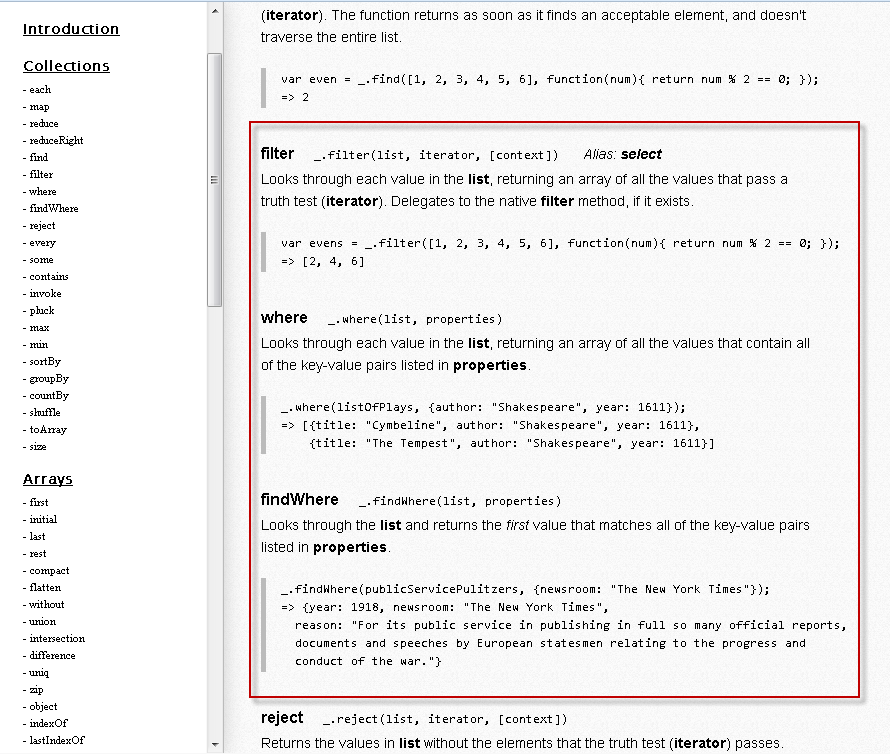
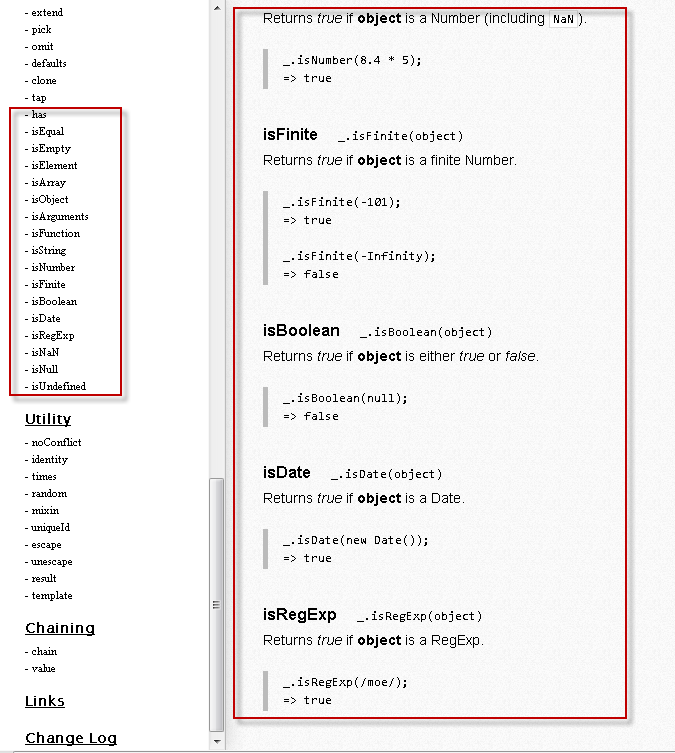
To me jQuery is javascript library that helps the developer in interacting with HTML element/DOM but what library that can be used to help in manipulating the Javascript object?I found “Underscore.js” which can be found in here (http://underscorejs.org). It provides the user to manipulate the JS object (e.g It provides function to manipulate Arrays, Add delay to your function, throttling your JS function, Check the data type of an object, etc)

A couple functions that I found useful

1. Manipulating your JSON object with “Where, filter and findWhere”

2. A few helpers to validate the data type of an object

Build Custom View Engine to override default views folder in ASP.NET MVC

So here is the situation, I need to build a personalization for the user where they can have different View files based on their user preference or alternatively they can pick their own View folder. To better explain the situation, look at the folder structure below
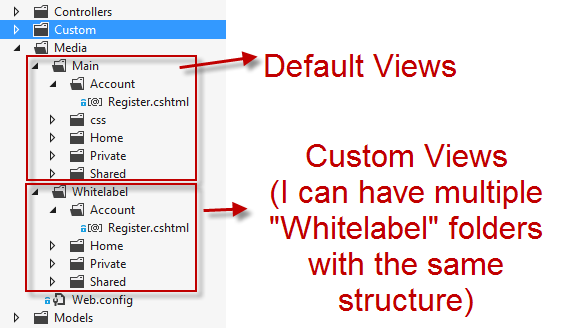
ViewPersonalisation-FolderStructure

So basically, I don’t want it to be under “Views” folder anymore instead I want my views to be under “Media” folder and by default if the user hasn’t specified which “Views” folder that they want to select then it should use the default one which is “Main” folder

First of all, we need to create our own View Engine that inherits from “RazorViewEngine” and then we need to override the default “ViewLocation“, “PartialViewLocation” and “MasterLocation” with our own default location which is “Media”

Secondly, we need to override “CreateView” method and “CreatePartialView” method to replace the default view location with the one defined in database/user settings

*Note: in the code below “CacheManager.CurrentSite.FolderPath” is storing the “Views” folder that the user has selected in their profile. “UseCustomViewLocation” function is used in this case to not have the personalisation on any of the “Admin Area”
[code language=”csharp”]
using System;
using System.Collections.Generic;
using System.Linq;
using System.Web;
using System.Web.Mvc;
using System.IO;</code>

namespace WebUI.Custom.ViewEngine
{
public class WhitelabelViewEngine : RazorViewEngine
{
private const string WHITELABELVIEWFOLDER = "Whitelabel";
private const string MAINFOLDER = "Main";
private const string EXCLUDED_AREA = "admin";

public WhitelabelViewEngine()
{
base.ViewLocationFormats = new[] {
"~/Media/" + MAINFOLDER + "/{1}/{0}.cshtml",
"~/Media/" + MAINFOLDER + "/{1}/{0}.vbhtml",
"~/Media/" + MAINFOLDER + "/Shared/{0}.cshtml",
"~/Media/" + MAINFOLDER + "/Shared/{0}.vbhtml"
};

base.MasterLocationFormats = new[] {
"~/Media/" + MAINFOLDER + "/{1}/{0}.cshtml",
"~/Media/" + MAINFOLDER + "/{1}/{0}.vbhtml",
"~/Media/" + MAINFOLDER + "/Shared/{0}.cshtml",
"~/Media/" + MAINFOLDER + "/Shared/{0}.vbhtml"
};

base.PartialViewLocationFormats = new[] {
"~/Media/" + MAINFOLDER + "/{1}/{0}.cshtml",
"~/Media/" + MAINFOLDER + "/{1}/{0}.vbhtml",
"~/Media/" + MAINFOLDER + "/Shared/{0}.cshtml",
"~/Media/" + MAINFOLDER + "/Shared/{0}.vbhtml"
};
}

protected override IView CreatePartialView(ControllerContext controllerContext, string partialPath)
{
IView partialView = base.CreatePartialView(controllerContext, partialPath);

if (UseCustomViewLocation(controllerContext))
{
partialView = base.CreatePartialView(controllerContext, partialPath.Replace(MAINFOLDER, CacheManager.CurrentSite.FolderPath));

if (!File.Exists(controllerContext.HttpContext.Server.MapPath(((RazorView)partialView).ViewPath)))
partialView = base.CreatePartialView(controllerContext, partialPath);
}

return partialView;
}

protected override IView CreateView(ControllerContext controllerContext, string viewPath, string masterPath)
{
IView pageView = base.CreateView(controllerContext, viewPath, masterPath);

if (UseCustomViewLocation(controllerContext))
{
pageView = base.CreateView(controllerContext, viewPath.Replace(MAINFOLDER, CacheManager.CurrentSite.FolderPath),
masterPath.Replace(MAINFOLDER, CacheManager.CurrentSite.FolderPath));

if (!File.Exists(controllerContext.HttpContext.Server.MapPath(((RazorView)pageView).ViewPath)))
pageView = base.CreateView(controllerContext, viewPath, masterPath);
}

return pageView;
}

///
/// to check whether in the custom area or not
///

//////
private bool UseCustomViewLocation(ControllerContext controllerContext)
{
bool useCustomViewLocation = false;

if (controllerContext.RouteData.DataTokens["area"] == null || (controllerContext.RouteData.DataTokens["area"] != null &amp;&amp; controllerContext.RouteData.DataTokens["area"] != EXCLUDED_AREA))
{
useCustomViewLocation = true;
}

return useCustomViewLocation;
}
}
}
[/code]

Lastly, We also need to register our custom view engine in Global.asax
[code language=”csharp”]
public class MvcApplication : System.Web.HttpApplication
{
protected void Application_Start()
{
WebApiConfig.Register(GlobalConfiguration.Configuration);
FilterConfig.RegisterGlobalFilters(GlobalFilters.Filters);
RouteConfig.RegisterRoutes(RouteTable.Routes);
BundleConfig.RegisterBundles(BundleTable.Bundles);
BootStrapper.Setup();

/*Register Whitelabel View Engine logic*/
ViewEngines.Engines.Clear();
ViewEngines.Engines.Add(new WhitelabelViewEngine());
}
}
[/code]

 

Custom Principal in ASP.NET

Great sample on how to implement Custom Principal in ASP.NET

http://www.creatingsoftware.net/2007/11/aspnet-20-forms-authentication-keeping.html

I’ll be using this technique to integrate with ASP.NET MVC so I can avoid using Session State completely

Excellent article about System.Collections in .NET

http://geekswithblogs.net/BlackRabbitCoder/archive/2011/06/16/c.net-fundamentals-choosing-the-right-collection-class.aspx

Entity Framework – Schema MigrateDatabaseToLatestVersion

I’ve been using EF for quite sometimes and I use Code First to build my schema. The question that I always have in mind is “Once the project is released and we need to add a new entity or add a new column  to the existing entity, how do we tackle that?” and the question is even asked by my colleague. My answer was “oh, we can track down our changes by hand on a SQL file” and “I also try to be smart by saying we can get the latest production DB and compare it with the Development DB locally by using Database project or by using RedGate Schema Compare”


I’m still not happy even with my own answer!! and I believe that it’s not only me facing this problem and Microsoft should be smart enough to tackle this problem. So I start doing my research and I found the answer that I’m looking for – EF has an initializer called “MigrateDatabaseToLatestVersion” which accept 2 parameters DB Context and Configuration. So what is Configuration?It is a class that inherits from DbMigrationsConfiguration

So how do I get this class?There are 2 possible ways:

1. Use PackageManager Console (on your data layer project) and type the code below and it will create a new folder called “Migration” and a file with name “Configuration”

[code language=”bash”]PM>enable-migrations -enableautomaticmigration [/code]

2. Create a file called “Configuration.cs/.vb” or with whatever name that you wanted and paste the code below

[code language=”csharp”]
namespace GenericSolution.Data.Migrations
{
using System;
using System.Data.Entity;
using System.Data.Entity.Migrations;
using System.Linq;
using GenericSolution.Data;

internal sealed class Configuration : DbMigrationsConfiguration<GenericSolutionContext>
{
public Configuration()
{
AutomaticMigrationsEnabled = true;
//***DO NOT REMOVE THIS LINE,
//DATA WILL BE LOST ON A BREAKING SCHEMA CHANGE,
//TALK TO OTHER PARTIES INVOLVED IF THIS LINE IS CAUSING PROBLEMS
AutomaticMigrationDataLossAllowed = true;
}

protected override void Seed(GenericSolutionContext context)
{
// This method will be called after migrating to the latest version.

// You can use the DbSet<T>.AddOrUpdate() helper extension method
// to avoid creating duplicate seed data. E.g.
//
// context.People.AddOrUpdate(
// p => p.FullName,
// new Person { FullName = "Andrew Peters" },
// new Person { FullName = "Brice Lambson" },
// new Person { FullName = "Rowan Miller" }
// );
//
}
}
}
[/code]

*AutomaticMigrationDataLossAllowed is a property that allow you to automatically drop the column from the schema when you remove a property from your entity class. By default, it sets to false which means it will throw an exception “AutomaticDataLossException” when you try to remove column from your table. So please use it cautiously

Next step is to use this configuration on your DBContext initializer which can be on your DBFactory class

[code language=”csharp”]
public DBFactory()
{
//Create database when not exists with code below
//Database.SetInitializer(new CreateDatabaseIfNotExists<GenericSolutionContext>());

//Pass null when you already have the database exists and no changes
//Database.SetInitializer<GenericSolutionContext>(null);

//Automatic schema migration
Database.SetInitializer(new MigrateDatabaseToLatestVersion<GenericSolutionContext, Configuration>());

}
[/code]

There is another class that will create an empty migration so that the future migrations will start from the current state of your database. I will update this blog once I know in detail about the functionality of it

1. Getting it by using PM Console

[code language=”bash”]PM> Add-Migration InitialMigration -IgnoreChanges[/code]

2. Create a class

[code language=”csharp”]
namespace GenericSolution.Data.Migrations
{
using System;
using System.Data.Entity.Migrations;

public partial class InitialMigration : DbMigration
{
public override void Up()
{
}

public override void Down()
{
}
}
}
[/code]

Page 5 of 19

Powered by WordPress & Theme by Anders Norén